

Vault Secrets Operator (VSO) has simplified secrets management between HashiCorp Vault and Kubernetes by automatically syncing secrets from Vault into Kubernetes Secret objects. This approach fits naturally into existing Kubernetes patterns, but it also has a tradeoff: with the default VSO workflow, those secrets ultimately land unencrypted in etcd, the cluster’s persistent data store.
While there are several other methods for integrating Vault secrets and Kubernetes, there is also a way to make VSO integration more secure and ephemeral. Vault Enterprise offers a protected secrets approach for VSO that uses a CSI driver to deliver secrets into Kubernetes pods, without storing anything in etcd.
This post evaluates the differences between the default VSO workflow and the ephemeral protected secrets model and explores the benefits of each approach.
»The default VSO model: Syncing secrets into Kubernetes
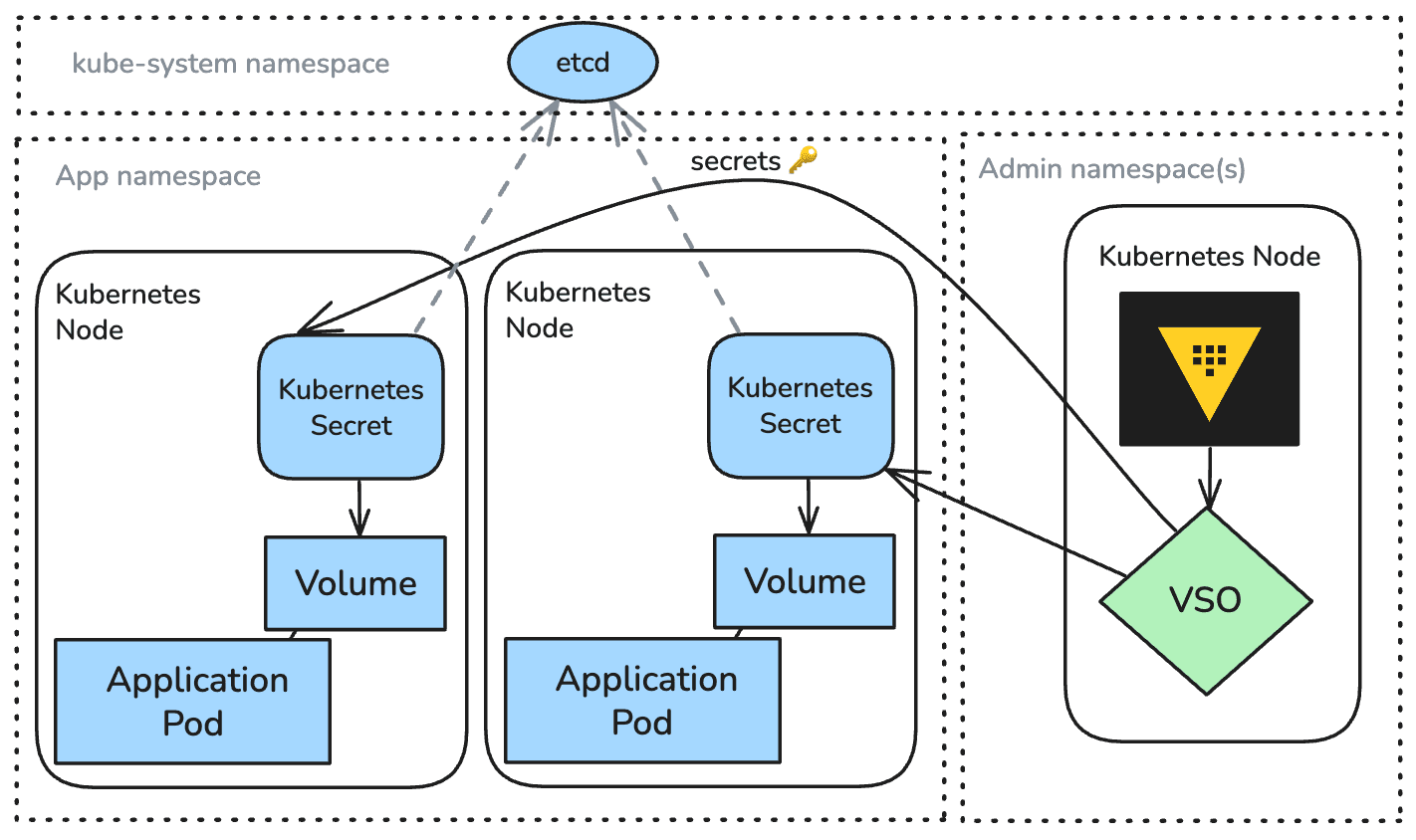
In the standard VSO workflow, the operator:
Monitors custom resources that declare which Vault secrets should be synced.
Fetches those secrets from Vault.
Writes them into native Kubernetes Secret objects that ultimately store the secret in etcd persistent storage.
Applications then consume those secrets using familiar patterns — environment variables, mounted volumes, or references in deployments. When Vault rotates or updates a secret, VSO updates the corresponding Kubernetes Secret so workloads can pick up the change.
»Benefits
Simple adoption using existing Kubernetes constructs
Native compatibility with any application expecting Kubernetes Secrets
Automatic reconciliation when Vault values change
This model stores secret data in etcd, the Kubernetes cluster’s persistent datastore. Even with encryption at rest enabled, etcd could become a long-lived location where secret material exists independently of Vault. This increases the potential exposure window and creates additional considerations for cluster backup retention, RBAC scoping, and cluster compromise scenarios.
»Protected secrets: A CSI driver for ephemeral secrets
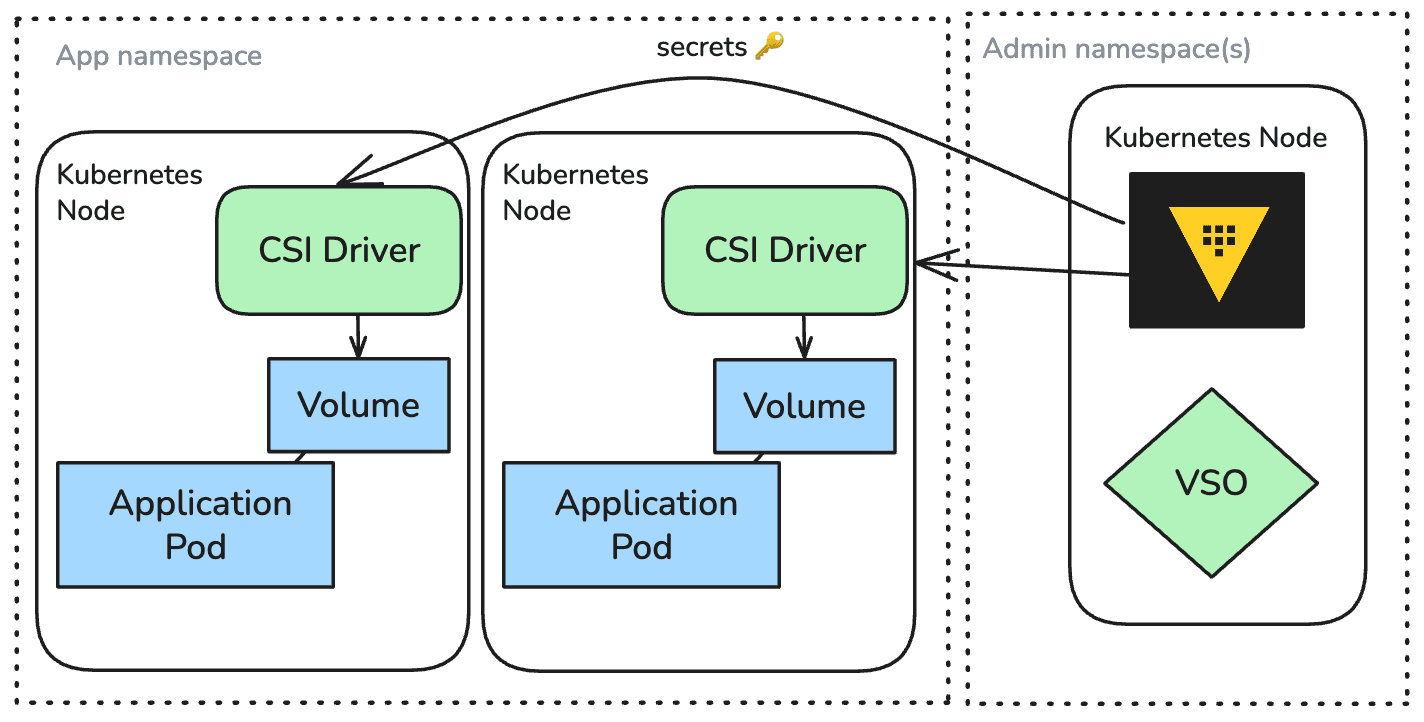
VSO’s protected secrets delivery model takes a different approach. Instead of creating Kubernetes Secret objects, VSO’s CSI driver mounts secrets into pods dynamically at runtime.
Here’s how it works:
Declare a protected secret resource: You define a custom resource that lists which Vault secrets to fetch and the RBAC rules that govern which pods can use them.
Pod requests the secret as a volume: A workload that needs those secrets references the protected secret resource as a CSI volume.
Secrets are isolated, available upon pod start-up: When an authorized pod starts, the CSI driver retrieves the secrets from Vault and mounts them directly into the pod’s filesystem.
No persistence, no etcd involvement: Nothing is cached in Kubernetes resources; the secrets exist only inside the pod where they’re consumed, and are removed when the pod terminates.
»Key advantages - How protected secrets reduce operational risk
No secrets stored in etcd: The biggest benefit is eliminating Kubernetes’ persistent storage from the trust chain. Secrets never land in the clusterʼs datastore, reducing the surface area of risk. Secrets are transferred through the VSO’s CSI driver, adding a layer of protection outside of the Kubernetes workflow but accessible by the pod when required.
Just-in-time access: Secrets are delivered at runtime, scoped to the workload that needs them, and revoked when the pod terminates. This avoids creating a long-lived location for secrets and ensures the secret is only accessible while the pod is running.
Strong, clear access boundaries: Access rules live in the protected secret resource, ensuring that only specifically authorized pods can mount the secret volume.
Better for regulated or high-security environments: Secrets are protected in Vault and only replicated there, making this workflow compliant for organizations that can't allow secret replication outside of Vault.
Rotations become natural: Because secrets are fetched at pod startup, rotation does not require syncing new content into Kubernetes objects. Workloads simply receive the updated secret next time they restart or refresh.
»Comparing the two models
»When to use protected secrets
Protected secrets are ideal for organizations that
Operate with high-security in regulated environments
Have internal policies prohibiting storing secrets outside Vault
Require shorter exposure windows and no long-term persistence
Manage multi-tenant or multi-team clusters with strict isolation requirements
For teams that still need native Kubernetes Secret objects, the default VSO model remains fully supported. Many organizations will mix both, using synced Secrets for low-sensitivity data and using protected secrets for credentials, keys, and high-impact secrets.
»Try protected secrets
By eliminating the reliance on etcd and leveraging just-in-time mounting, platform teams gain stronger security guarantees with minimal change to application workflows. As organizations continue to scale their Kubernetes environments and tighten security controls, protected secrets give Vault users a powerful new tool for reducing risk while keeping operations flexible and streamlined.
Read our overview, setup, and troubleshooting sections of the VSO protected secrets guide on HashiCorp Developer.
Learn more about HashiCorp Vault’s features and see if HCP Vault Dedicated or Vault Enterprise is right for you. Get $500 credits for any HCP service upon sign up.