


In the past few months, the HashiCorp Terraform engineering team has continuously improved features to help organizations eliminate infrastructure blind spots and strengthen governance and security across the entire infrastructure lifecycle. The latest HCP Terraform and Terraform Enterprise improvements include:
· Billable resource analytics (GA)
· Project-level remote state sharing (GA)
· Module testing for dynamic credentials (GA)
· Project-level notification (GA)
· Registry tagging (Beta)
»Billable resource analytics
Feature gap: Organizations using resources under management (RUM)-based billing face a significant visibility challenge when trying to understand where infrastructure costs are coming from. Until now, HCP Terraform customers could only view their total billable managed resources at the organization level. Deeper insights into where resources were being consumed weren't available in an easily accessible way. This made it difficult to estimate costs, predict future consumption, and determine which elements in an organization are consuming what percentage of used resources.
What's new: We are introducing the general availability of billable resource analytics for HCP Terraform. This new capability transforms how organizations manage infrastructure costs by providing users with comprehensive visibility into resource consumption across their entire organization. By breaking down the current totals of billable managed resources by project and workspace, decision makers gain the insights needed to reduce unnecessary spending and optimize their infrastructure investments. Available as a self-service view on the existing usage page, this capability eliminates delays in accessing critical cost data and empowers organizations to take immediate action on cost optimization opportunities.
Benefits:
Cost visibility and predictability: Organizations gain the visibility needed to proactively manage infrastructure spending rather than reacting to unexpected bills. By identifying high-consumption projects and workspaces, organization owners can work with engineering teams to right-size resources, eliminate waste, and stay within budget constraints.
Data-driven decision making: Leaders can make informed decisions about infrastructure investments based on actual consumption patterns rather than guesswork. The detailed breakdowns reveal which projects consume the highest resources and where consolidation opportunities exist. This can enable strategic resource allocation that aligns infrastructure spending with business priorities.
To see what billable resource analytics has to offer, any user on a paid HCP Terraform plan can access the new view on the existing usage page for their organization.
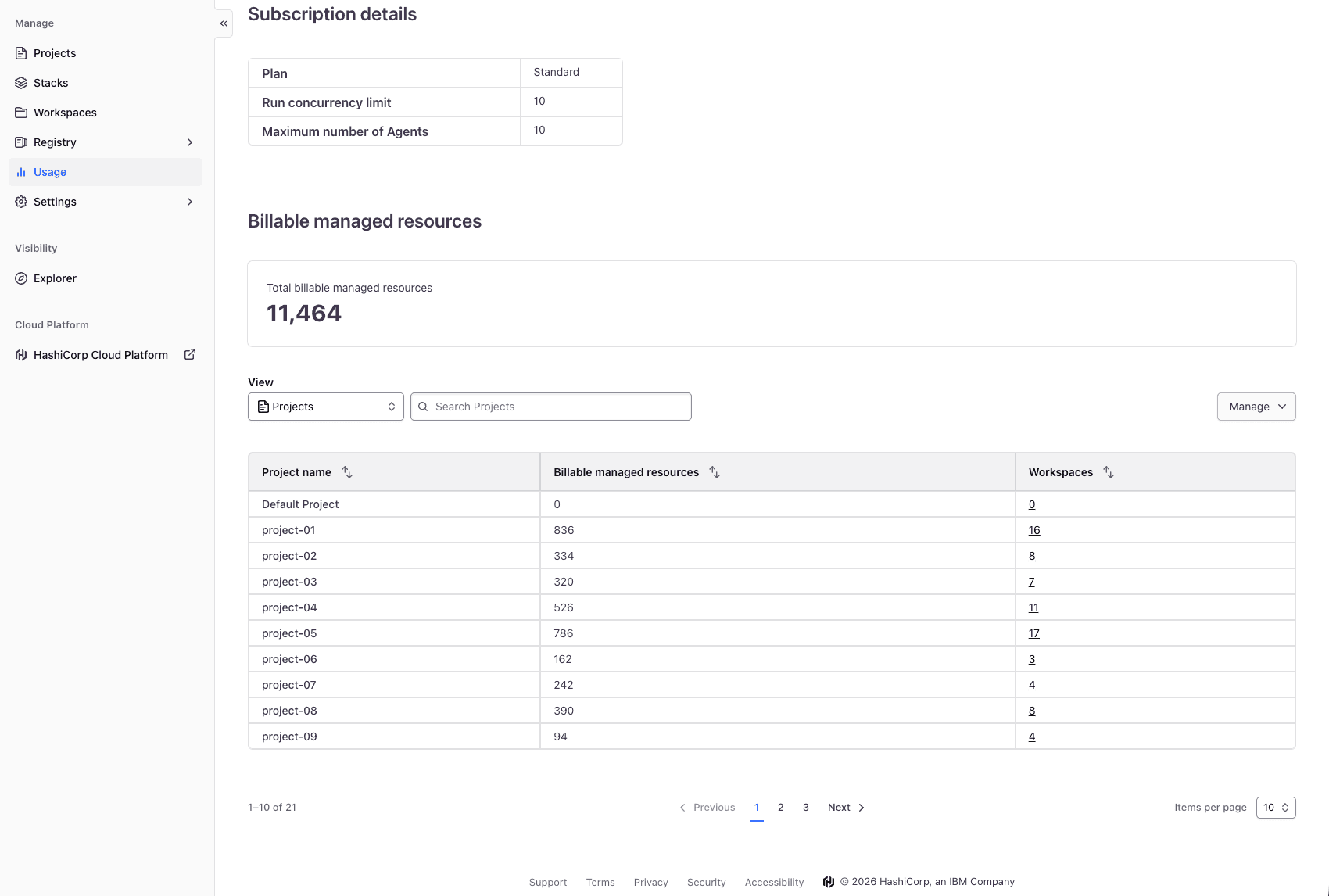
Billable resource table groups billable resource totals by projects, with the ability to search, filter, sort, and export to CSV for further review.
»Project-level remote state sharing
Feature gap: Until now, platform teams managing large-scale infrastructure on HCP Terraform and Terraform Enterprise faced a difficult trade-off when sharing data between workspaces using the terraform_remote_state data source. They were limited to two primary options: sharing state with every workspace in the entire organization, which increased the security risk, or manually managing a list of workspaces, which was slow and error-prone.
For large enterprises, organization-wide sharing is often too broad, exposing sensitive configurations to unrelated teams and violating the principle of least privilege. Conversely, manually maintaining access lists for hundreds or thousands of workspaces creates a massive operational burden. This gap forced many customers into an unsustainable "multi-organization" model — creating numerous separate organizations just to maintain security boundaries — which is difficult to manage and impacts system performance.
What's new: We are introducing the GA of a new remote state sharing option: "Share with all workspaces in this project" for HCP Terraform and Terraform Enterprise 1.1.0 and later. This feature allows you to use projects as a true isolation boundary so that users can have an effective way to control their state sharing, increasing security and developer velocity.
When this setting is enabled in a workspace’s general settings, its remote state becomes automatically accessible to any other workspace within the same project. This access is dynamic: If a new workspace is added to the project, it immediately gains access to the shared state. If a workspace is moved to a different project, its access is automatically revoked, and its own shared state is re-scoped to its new project environment.
Benefits:
Enhanced security through isolation: Organizations can now enforce strict data boundaries at the project level, ensuring that sensitive infrastructure outputs are only visible to the teams and services that actually need them.
Operational efficiency at scale: By automating access within a project, platform teams no longer need to manually update workspace relationships. This "set and forget" approach significantly reduces the management overhead associated with large-scale state sharing.
Simplified governance: This feature unblocks the transition from complex multi-organization architectures to a more streamlined project-based model. This consolidation leads to better performance, easier reporting, and a more cohesive management experience for administrators.
We continue to recommend using the tfe_outputs data source in the HCP Terraform/Enterprise Provider to access remote state outputs in HCP Terraform or Terraform Enterprise. The tfe_outputs data source is more secure because it does not require full access to workspace state to fetch outputs.
To learn more, check out our Workspaces settings documentation.
»Project-level notification
Feature gap: Until now, platform teams managing large-scale infrastructure on HCP Terraform faced a significant operational hurdle when configuring alerts and observability. They were required to configure notification settings, such as Slack webhooks, PagerDuty triggers, or email alerts manually on a workspace-by-workspace basis.
For enterprises scaling self-service infrastructure, maintaining these individual configurations across hundreds or thousands of workspaces created a massive operational burden. This gap often led to "silent failures," situations where critical errors in newly provisioned environments went completely unnoticed by operations teams because the workspace creator forgot to configure the necessary alerts. Platform teams were forced to rely on brittle, custom-built audit scripts just to verify that their infrastructure was being monitored.
What's new: We are excited to announce the general availability (GA) of project-level notifications for HCP Terraform and Terraform Enterprise. This feature allows you to use projects as a centralized control plane to define your observability standards, ensuring that users have an effective, automated way to monitor their infrastructure at scale.
When a notification destination and trigger are configured in a project's settings, those alerts automatically cascade to every workspace within that project. This inheritance is dynamic: If a new "no-code" workspace is provisioned inside the project, it immediately inherits the project's alert settings. If a workspace is moved to a different project, its inherited notifications are automatically updated to match its new environment.
Benefits:
Enhanced reliability through "monitoring-by-default": Organizations can now enforce a strict observability baseline at the project level. This acts as an automated safety net, ensuring that no infrastructure is deployed without the proper alerts in place.
Operational efficiency at scale: By automating notification inheritance within a project, platform teams no longer need to manually configure workspaces or maintain external audit scripts. This "set and forget" approach significantly reduces the toil previously associated with large-scale incident management.
Simplified governance: This feature unblocks the ability to standardize incident routing based on environment or business unit. For example, you can guarantee that every workspace in the "production" project routes directly to the SRE PagerDuty service, leading to faster mean time to resolution (MTTR) and a more cohesive management experience for administrators.
To learn more about standardizing your observability workflows, you can check out the notifications settings in the HCP Terraform project notifications documentation.
»Module testing for dynamic credentials
Feature gap: Until now, there was a significant security disconnect between deploying infrastructure and testing it. While HCP Terraform users could use Dynamic Credentials for standard plan-and-apply operations, the native Terraform test framework often required a fallback to static credentials.
To run integration tests that interacted with real cloud resources, module authors were frequently forced to manually seed "test-only" AWS keys or Azure service principal secrets into their module testing environments. This created a secondary tier of "shadow secrets" that were often less rotated and less monitored than production credentials, creating a weak link in the secure supply chain and increasing the friction for developers who wanted to write robust, automated tests.
What’s new: We are extending dynamic credentials support to the Terraform module testing suite. This update allows the native testing workflow to leverage the same OIDC-based trust relationships used in standard runs.
Whether you are testing a module’s behavior in AWS, Azure, or Google Cloud, or verifying its interaction with HCP Vault, the testing environment can now automatically exchange an OIDC token for temporary, short-lived credentials. This ensures that your testing lifecycle is just as secure and "secret-less" as your production deployment lifecycle.
Benefits:
Unified security across the lifecycle: You no longer need to manage two different authentication methods, one for deployments and one for testing. OIDC now covers the entire journey from
terraform testtoterraform apply.Reduced developer friction: Developers can now write and run integration tests in HCP Terraform without the manual hurdle of requesting and configuring static "test" keys. Tests "just work" as long as the OIDC trust is established.
Ephemeral testing environments: Because credentials are generated on –the fly for the duration of the test and expire immediately after, the risk of "orphaned" test credentials lingering in your environment is completely eliminated.
Consistent governance: Platform teams can now enforce a single, identity-based policy across the organization, ensuring that even experimental or test-phase infrastructure follows the principle of least privilege.
Next steps: To start using OIDC in your tests, ensure your workspace is configured for dynamic credentials and update your module's test files to leverage the provider's default authentication. You can find more details on integrating these features in the HCP Terraform testing documentation.
»Registry tagging
Feature gap: Today, you can define tags as key-value pairs on your projects to organize them and track resource consumption, and a workspace automatically inherits its project’s tags. But until now, you didn’t have the ability to tag your registry artifacts (modules and providers), slowing discovery and association with projects and workspaces for usage guidance. Also, there was no easy way to indicate the status of module and provider versions, such as “non-prod” or “prod.” This made choosing the appropriate version for downstream consumers challenging.
What's new:Today, we are excited to announce the public beta of registry tags, allowing the platform team to tag artifacts with project information and usage guidance. Project tags on registry artifacts, now available for all HCP Terraform users, and the new registry environment tags, available for HCP Terraform standard and premium, increase the accuracy and speed for downstream consumers when choosing artifacts without confusion or guesswork.
For example, a new module version with a “non-prod” tag indicates it should be used in non-production environments. After successful testing, teams that develop modules can change the tag to “prod” (or simply add the “prod” tag) to indicate that the version is approved for production environments. By doing so, the downstream consumers are clear about the appropriate version for their environment to use, and teams that develop modules can speed up module testing and promotion.
Benefits:
Enhanced security: Platform teams can distinguish the approved artifacts and artifact versions easily based on the tags, decreasing security risks caused by using the wrong artifacts and artifact versions. Promoting artifact versions with tag assignment from one environment designation to the next allows proper testing with deployments before a new version is deemed appropriate for production.
Operational efficiency at scale: Registry tags enable faster artifact discovery for use in the proper projects. Users can filter the registry on their project’s or environment’s tags to find the right options quickly.
Simplified governance: By tagging artifacts with your preexisting project tags, you extend the same classification categories you use today to your modules and providers, encouraging users to choose the artifacts that share tags with their projects.
To learn more, you can check out our Managing registry tags documentation.
»Get started with HCP Terraform and Terraform Enterprise
You can try many of these new features now. If you are new to Terraform, sign up for an HCP account to get started today, and also check out our tutorials. HCP Terraform includes a $500 credit that allows users to quickly get started using features from any plan, including HCP Terraform Premium. Contact our sales team if you’re interested in trying our self-managed offering: Terraform Enterprise.