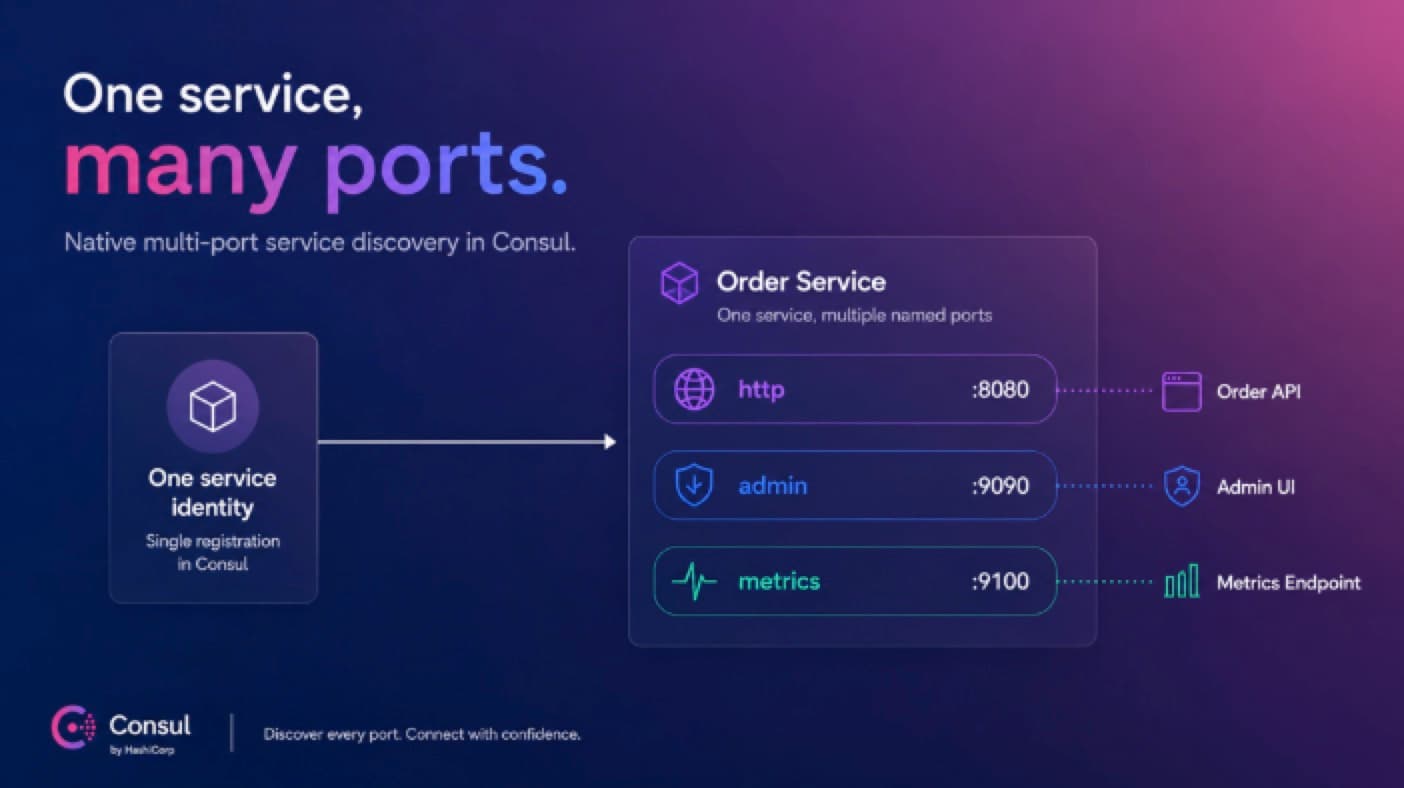
Modern applications rarely expose just one port. A single service might serve user-facing API traffic on one port, publish metrics on another, and keep an admin or gRPC endpoint on a third.
That is ordinary application design. Until now, it was not always ordinary service discovery.
Consul now supports a cleaner model:
Capability | Availability | What it means |
Multi-port service discovery | Consul 1.22.0+ | Register one service with multiple named ports and discover the port you need |
Multi-port service mesh routing (beta) | Consul Enterprise 2.0.0+ | Route mesh traffic to the right named port through one service identity and one sidecar |
One service. Multiple named ports. Less catalog clutter.
»The old workaround
Before native multi-port support, one real application often became several Consul services: order-http, order-admin, order-metrics, and sometimes more.
This worked, but it made operations harder than they needed to be:
Health and observability were split across multiple service entries.
Policies and intentions had to account for several names instead of one identity.
Dashboards and runbooks had to mentally reassemble the real application.
Kubernetes services and Consul service registrations did not line up naturally.
Native multi-port support lets Consul model the application the way teams already understand it. The service stays one identity. Each port gets a name.
»The new discovery model
In Consul 1.22, a service can register a list of named ports. Here is a complete HCL example with the nonessential, deployment-specific pieces redacted:
service {
  name    = "order-service"
  id      = "order-service-1"
  address = "10.42.0.25"

  tags = [
    "team:payments",
    "env:prod",
    "redacted:..."
  ]

  meta = {
    version = "v1"
    owner   = "redacted-team"
    # ... other service metadata
  }

  ports = [
    {
      name    = "http"
      port    = 8080
      default = true
    },
    {
      name = "admin"
      port = 9090
    },
    {
      name = "metrics"
      port = 9100
    }
  ]

  checks = [
    {
      id       = "order-service-http"
      name     = "HTTP health"
      http     = "http://10.42.0.25:8080/health"
      interval = "10s"
      timeout  = "2s"
    },
    {
      id       = "order-service-metrics"
      name     = "Metrics endpoint"
      http     = "http://10.42.0.25:9100/-/healthy"
      interval = "30s"
      timeout  = "2s"
    }
  ]
}
The default port keeps older clients working. Clients that only know about a single port still receive 8080. Newer clients can ask for admin or metrics directly.
»DNS by port name
Consul DNS can now answer both questions:
# Give me the default port
dig @127.0.0.1 -p 8600 _order-service._tcp.service.consul SRV
# Give me the metrics port
dig @127.0.0.1 -p 8600 _order-service._tcp.service.metrics.port.consul SRV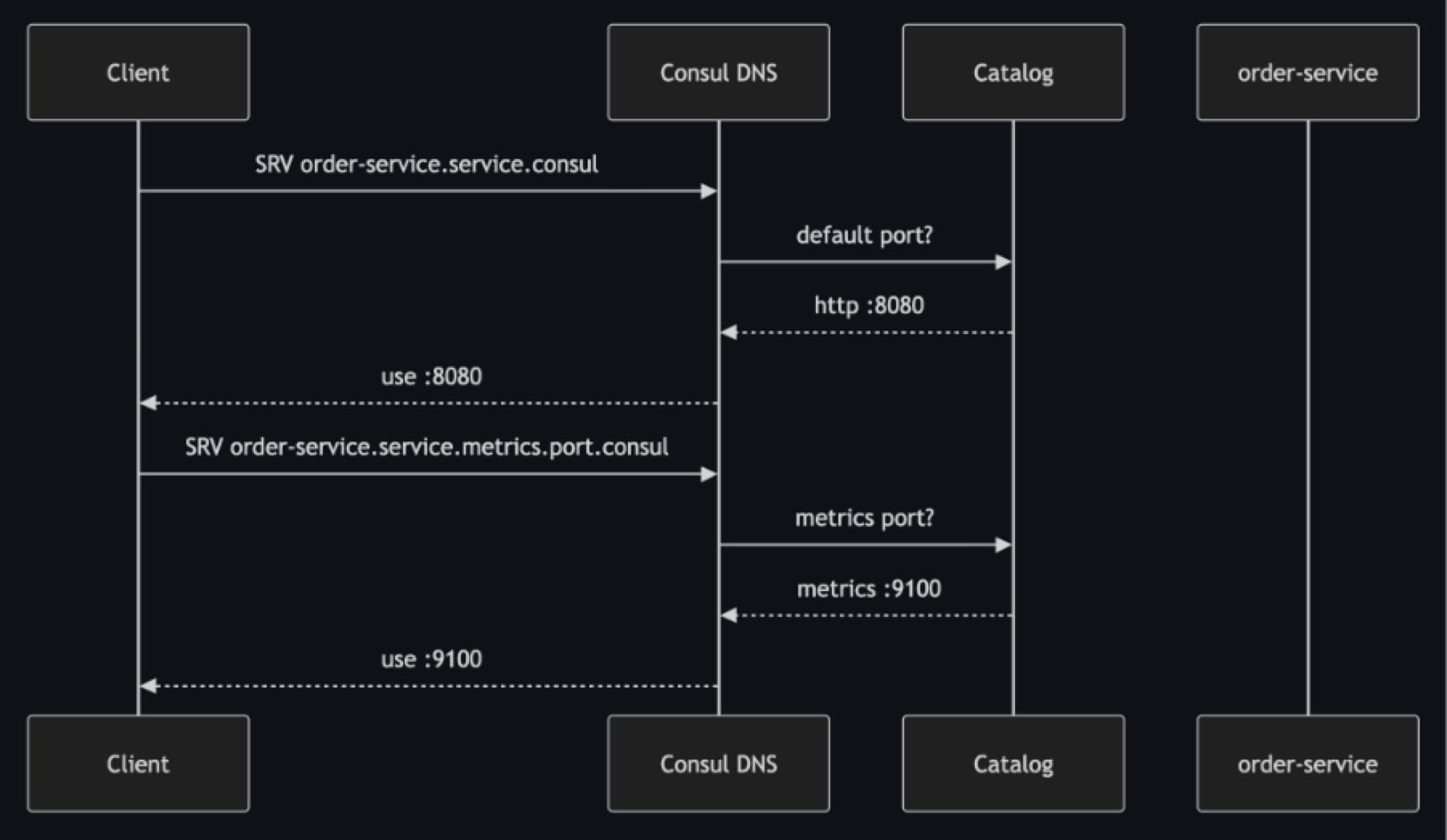
If the requested port name does not exist, Consul returns NXDOMAIN instead of guessing.
»HTTP API compatibility
The HTTP APIs remain backward compatible. Catalog responses still include the default ServicePort, and port-aware clients can read the full ServicePorts list:
{
  "ServiceName": "order-service",
  "ServicePort": 8080,
  "ServicePorts": [
    { "Name": "http", "Port": 8080, "Default": true },
    { "Name": "admin", "Port": 9090 },
    { "Name": "metrics", "Port": 9100 }
  ]
}
The important idea is not the JSON field itself. It is compatibility: Existing consumers keep working, while new consumers can become portaware. Agent-local responses follow the same pattern with Port and Ports.
»Kubernetes service sync
Kubernetes services already have named ports, so the mapping is natural. When Consul syncs a Kubernetes service with multiple ports, it preserves those service ports in the Consul catalog. The first port becomes the default unless you choose one with the consul.hashicorp.com/connect-service-default-port annotation.
apiVersion: v1
kind: Service
metadata:
  name: order-service
spec:
  ports:
  - name: http
    port: 8081
    targetPort: 8080
  - name: metrics
    port: 9101
    targetPort: 9100
  type: ClusterIP
In Consul, that appears as one service with two named ports. ServicePort is populated with the default value for compatibility, while ServicePorts carries the complete list.
For NodePort services, Consul syncs the Kubernetes nodePort values because those are the externally reachable ports. Consul-to-Kubernetes sync does not write Consul ports data back into Kubernetes service definitions.
Health checks and tagged addresses
Health is still tracked at the service-instance level, not independently per port. You can define checks that probe different endpoints, but the service instance is still marked healthy or unhealthy.
Tagged addresses also use the default port when a service registers with ports. That keeps existing LAN and WAN address behaviours predictable while adding named-port discovery for clients that need it.
»Kubernetes mesh modes
Kubernetes services already have named ports, and Consul maps those cleanly into one service identity with named destinations.
For service-mesh traffic on Kubernetes, both deployment styles are supported:
Non-transparent proxy (explicit upstreams): Declare upstreams and set
destination_portfor the named port you want.Transparent proxy (
tproxy): Route by port-specific virtual DNS names, for examplemetrics.order-service.virtual.consul.
Kubernetes teams can use multi-port services whether they prefer explicit upstream wiring or transparent interception.
The official Kubernetes service mesh workload scenarios show the common deployment patterns, including pods, jobs, upstreams, and multi-port workloads.
»Mesh: One sidecar, multiple destinations
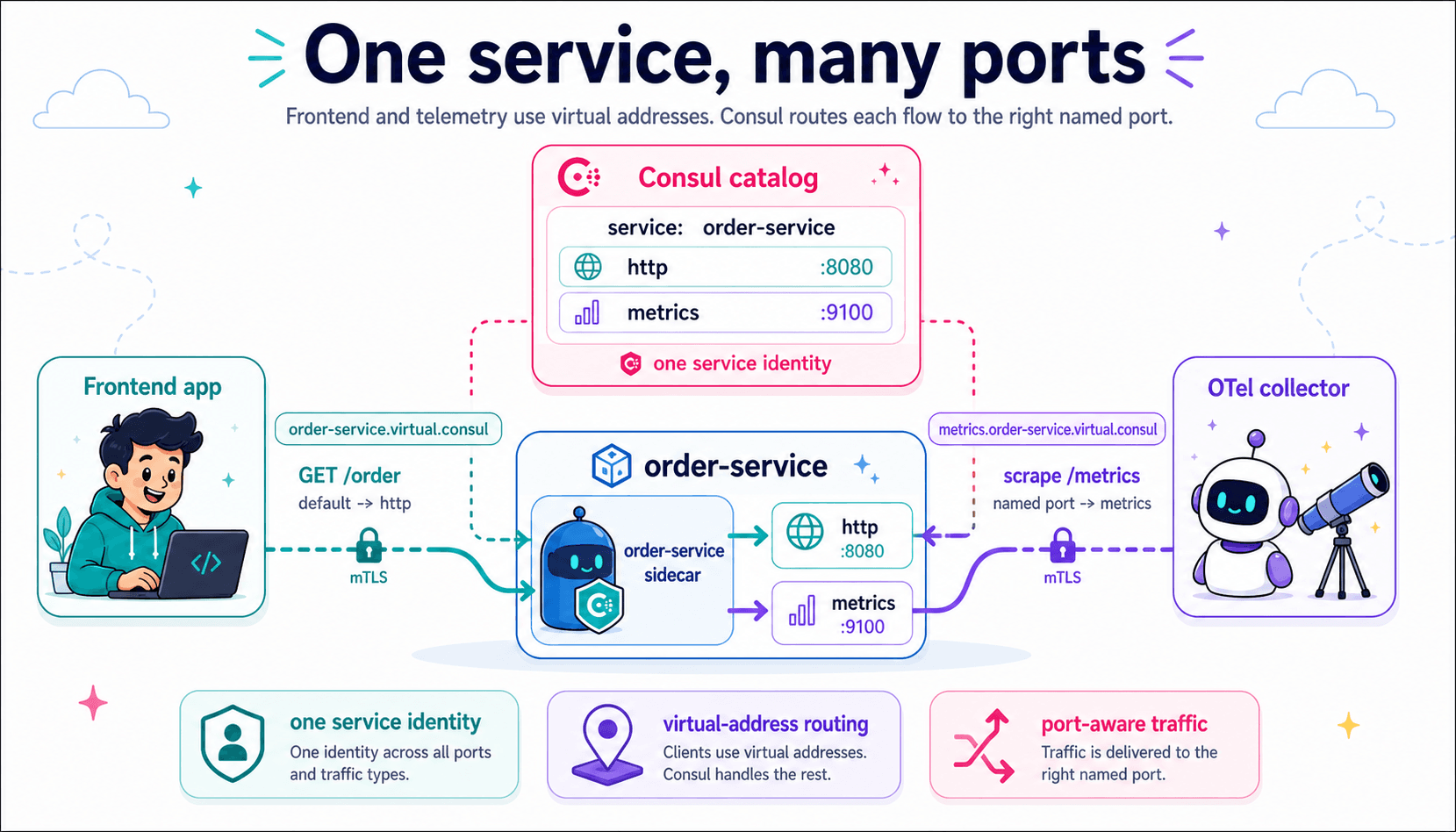
Service discovery answers: "Which port should this client use?"
Service mesh answers the next question: "How does traffic reach the right port securely?"
With Consul multi-port service mesh (beta), a single service can keep one mesh identity and one sidecar while exposing multiple named application ports.
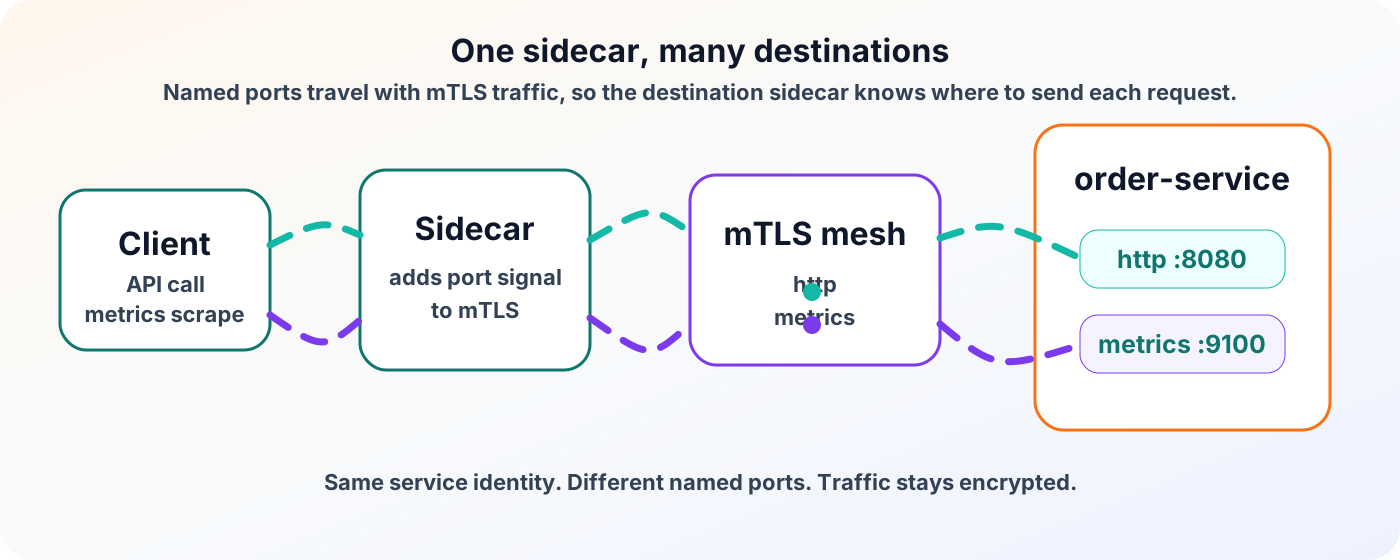
Under the hood, the caller sidecar carries the destination port name in the TLS handshake using ALPN. The destination sidecar uses that signal to route traffic to the matching local port.
For operators, the benefit is easier to say:
API traffic and metrics traffic can both move through the mesh, without splitting order-service into separate service identities.
»Explicit upstreams and transparent proxy
Multi-port mesh works with both common Consul service mesh patterns:
Mode | How the port is selected |
Explicit upstreams | Configure a named destination port, such as destination_port = "metrics" |
Transparent proxy | Use a port-specific virtual DNS name, such as metrics.order-service.virtual.consul |
The DNS distinction is worth remembering:
Use .service.consul when a client connects directly. Use .virtual.consul when transparent proxy should carry traffic through the mesh.
»Guardrails and compatibility
The model is intentionally small:
Rule | Why it matters |
Use either port or ports | Avoids conflicting service definitions |
Give every port a unique name | Clients and mesh routing need a stable handle |
Mark one port as default | Older clients can still resolve one port |
Keep health at the service-instance level | Multi-port health is planned separately |
Tagged addresses use the default port. Health checks can still probe different endpoints, but the health result applies to the service instance.
That balance lets teams adopt multi-port discovery without breaking the large ecosystem of tools that already expect a single default service port.
»Coming next
Multi-port support is expanding across Consul's broader service networking surface.
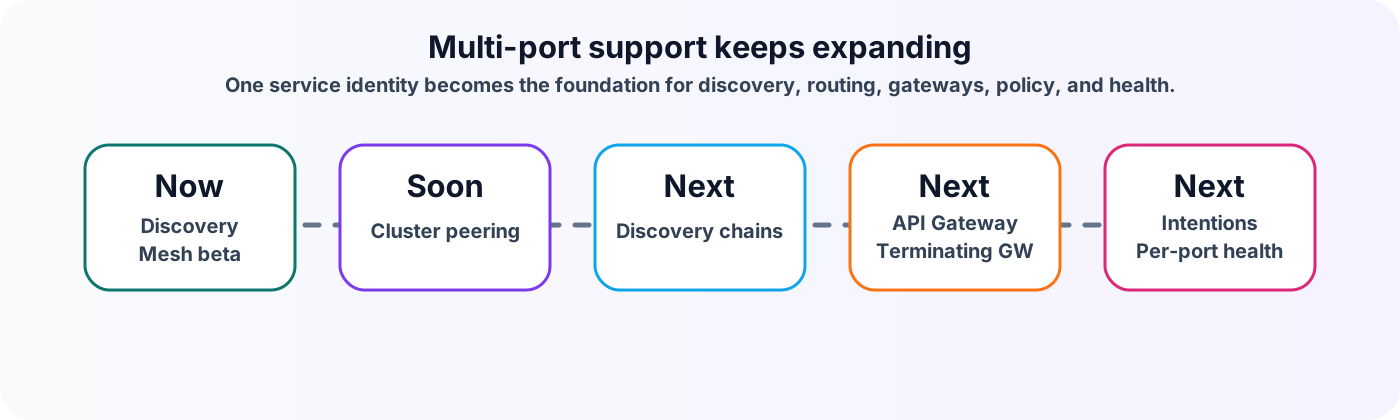
Cluster peering support for native multi-port service mesh routing is coming soon. Until that lands, peered multi-port traffic can fall back to default-port behavior instead of dispatching by named port.
Future work will also bring named-port awareness to discovery chains, API Gateway, terminating gateway, intentions, and health. The direction is consistent: Keep one service identity, but give operators port-level precision where policy and routing need it.
»Why this matters
Native multi-port services remove a long-standing mismatch between how applications run and how they had to be represented in Consul.
With native multi-port support:
One application can stay one Consul service.
DNS can return the exact port a client needs.
Kubernetes service ports sync cleanly into Consul.
Mesh traffic can route to the right local port through one sidecar.
Future policy and routing features can build on the same named-port model.
It is a small modeling change with a big operational payoff: Fewer duplicate registrations, fewer naming conventions, and a catalog that looks more like the applications it represents.