

In Boundary, a dynamic host catalog is like an automated inventory system that discovers and manages infrastructure targets by syncing directly with cloud providers (such as AWS, Azure, or Google Cloud) rather than relying on manual entry. Instead of an administrator statically defining IP addresses, the catalog uses plugins to query your infrastructure based on tags (e.g. "all EC2 instances tagged Environment=Prod"). As VMs are provisioned or terminated, the catalog updates in near real-time, ensuring that the list of connectable hosts in Boundary always matches the actual state of your dynamic infrastructure without human intervention.
Managing such a dynamic infrastructure often means dealing with hosts that have multiple network interfaces and IP addresses. If you are running resources in AWS, Azure or GCP, you know that a single instance can have a public IP, a private IP, and potentially others assigned to different subnets. For Boundary administrators, ensuring that sessions connect to the right IP address, specifically the one reachable by your Boundary worker, is critical for connectivity and security.
In this post, we will cover why multi-homed hosts pose a challenge, how preferred endpoints solve it, and how to configure it using Terraform and the CLI.
»The challenge of hosts with multiple IP addresses
In modern cloud environments, resources are rarely simple. A host is an EC2 instance or an Azure VM, which often possesses multiple IP addresses. For example, an AWS EC2 instance might have a primary Elastic Network Interface (ENI) address, a secondary private IP, and a public-facing IP.
When Boundary creates a session, it needs to select one of these addresses to establish the connection. Without a clear priority, when users initiate a connection to a target host, Boundary might attempt to connect via an IP address that is unreachable from the specific Boundary worker handling the session (e.g. trying to use a public IP when the worker is inside a private VPC). This may lead to failed connection attempts and frustration for end users.
»Preferred endpoints
To address this, Boundary utilizes the Preferred Endpoint field within the dynamic host catalog. This field allows you to define an ordered list of criteria to determine which address Boundary should prioritize when creating a session.
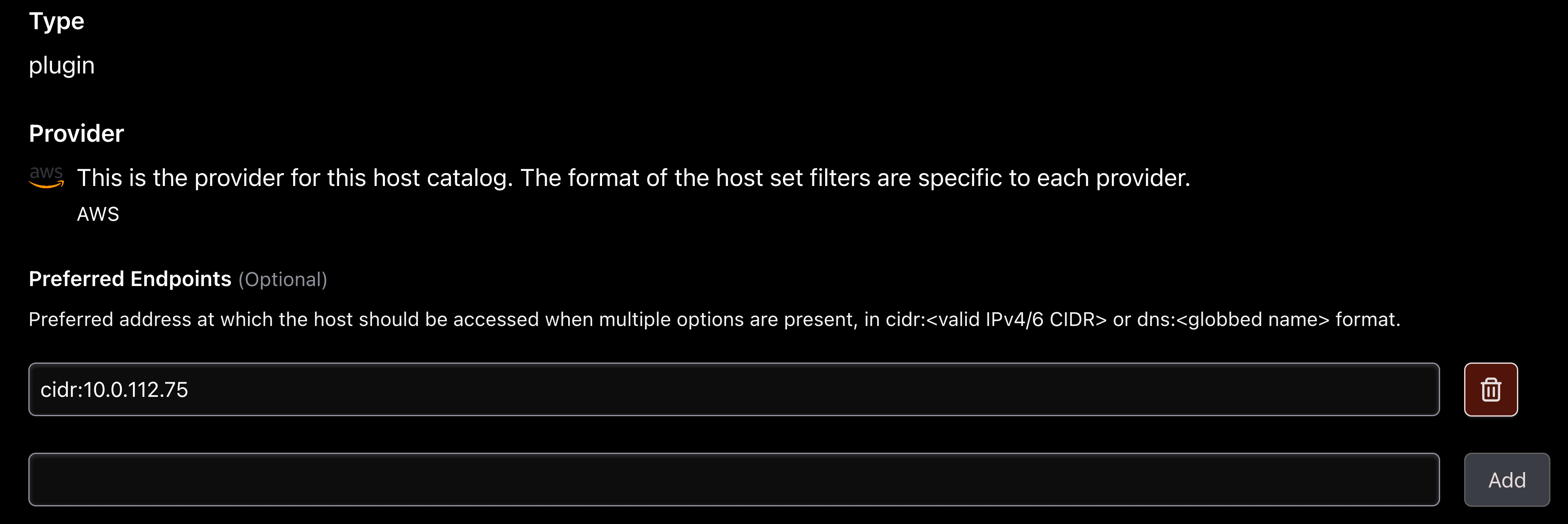
By default, Boundary uses the following prioritization for selecting IP addresses to establish a connection with:
Private IPv4
Public IPv4
DNS
Private IPv6
Public IPv6
However, in complex network topologies, you often need more granular control. Preferred endpoints allow you to map a preference to specific network ranges or specific IPs.
»Configuring preferred endpoints
You can configure preferred endpoints using CIDR blocks or DNS values. This flexibility ensures you can target addresses based on subnet structure or naming conventions.
»Syntax overview
The field accepts a list of selector strings in the following formats:
CIDR: cidr:
<valid IPv4/6 CIDR>(e.g.cidr:10.0.0.0/16)DNS: dns:
<globbed name>(e.g.dns:*.internal)
You can configure this via the Boundary UI, CLI, or Terraform.
»Terraform configuration
For those managing Boundary with infrastructure as code, the boundary_host_set_plugin resource supports the preferred_endpoints argument.
resource "boundary_host_set_plugin" "aws_set" {
  name            = "aws-prod-set"
  host_catalog_id = boundary_host_catalog_plugin.aws_catalog.id
  attributes_json = jsonencode({ "filters" = ["tag:Env=Prod"] })

  # Prioritize private subnet IPs first, then internal DNS names
  preferred_endpoints = [
    "cidr:10.0.0.0/8",
    "dns:*.internal"
  ]
}
»See it in action: Pinning a secondary IP
To illustrate why this matters, consider a recent scenario involving an AWS EC2 target configured with two Network Interface Cards (NICs) and four distinct IP addresses: 10.0.112.123 (primary), 10.0.112.216, 10.0.112.126, and 10.0.112.74 (secondary).
»The problem:
The administrator wanted Boundary to connect specifically to the secondary IP 10.0.112.74. However, because the dynamic host catalog ingests all available IPs, Boundary defaulted to the instance's primary IP (10.0.112.123). Even though the target was correctly discovered, the connection flow was routing through the wrong interface.
»The solution:
The administrator can apply a specific CIDR filter to the host set to force the selection of the secondary IP:
-preferred-endpoint="cidr:10.0.112.74/32"
»Verification:
After applying the preferred endpoint, the administrator verified the connection on the target machine using netstat -tanlp. The output confirmed that the active SSH session was established on 10.0.112.74, bypassing the default primary IP and satisfying the network requirement.
»Improved documentation
We heard your feedback that the previous documentation for the Preferred Endpoint field was inadequate, so we have significantly expanded the resources available to help you configure this correctly.
Boundary documentation: The official docs now include detailed definitions and syntax guides for the Preferred Endpoint field.
Terraform Registry: The
boundary_host_set_plugindocumentation in the Terraform Registry now links to these definitions and includes concrete examples of syntax for both CIDR and DNS values.
These updates ensure that whether you are troubleshooting a connection issue or setting up a new environment, you have the reference material needed to configure host priority correctly.
»Next steps
If you are running multiple interface environments in AWS, Azure or GCP, we recommend reviewing your current host set configurations. Explicitly defining your preferred endpoints can reduce connection latency and prevent reachability errors.
Check out the updated Configure host catalog in AWS and the Boundary Terraform provider documentation to see the full details and examples.