

Many educational resources exist outside of IBM Vault to help users get the most value out of their secrets management experience with Vault. From developer docs to videos authored in-house by HashiCorp, an IBM company, to user and community-generated content, users have access to many resources outside of the product. Becoming a Vault expert requires accessing disparate knowledge that isn’t contextualized within the product.With the recent release of IBM Vault 2.0, we’ve taken the opportunity to holistically reassess Vault with a clear goal: make Vault easier to use, so that customers can onboard the product without needing a PhD in Vault.
Vault 2.0.1 includes improved reporting and visibility into consumption, helping organizations better understand how Vault is used across secrets management, key lifecycle management, identity brokering, and data protection. These enhancements provide greater transparency into usage patterns, enabling teams to improve operational visibility as well as support forecasting, planning, and governance initiatives.
»A focus on Vault onboarding and adoption
There are two key pillars we’re focusing on when planning the UI enhancements:
How do we help customers easily understand and discover new features? How do we match our features easily and intuitively to customer problems rather than expecting customers to be experts in Vault documentation?
How do we enable customers to quickly, easily, with best practices implementation, adopt features that strengthen their ability to deliver their own roadmaps?
»UI enhancements available in IBM Vault 2.0
Following are the key features and improvements designed to help customers onboard to Vault:
Visual policy generator - provides a pre-filled, contextual UI form that generates policy snippets. The policy snippets can be copied for use in the Terraform Vault Provider (recommended) or saved to the Vault cluster.
Onboarding wizard - starts customers off with simple questions about how they would use a feature and then generates an editable code snippet that supports their usage of the feature.
Introductory pages for new and existing features - details the feature’s value add and other helpful information with a recommended quick-start action.
Navigation bar revamp - groups features by customer problems to center the customer experience and contextualize the features that can best help them as they use Vault.
»Visual policy generator assists with code customization
New Vault users have no permissions by default. Assigning permissions to use any feature or interact with any resource requires writing the custom code for a policy. This can create an operational burden for administrators and a barrier for feature adoption.
In Vault 2.0, a contextual visual policy generator helps customers generate best practices and pre-filled policies from forms. The policy generator generates editable code, giving customers the option to get started with support. It’s customizable, so they can change the inputs as needed.
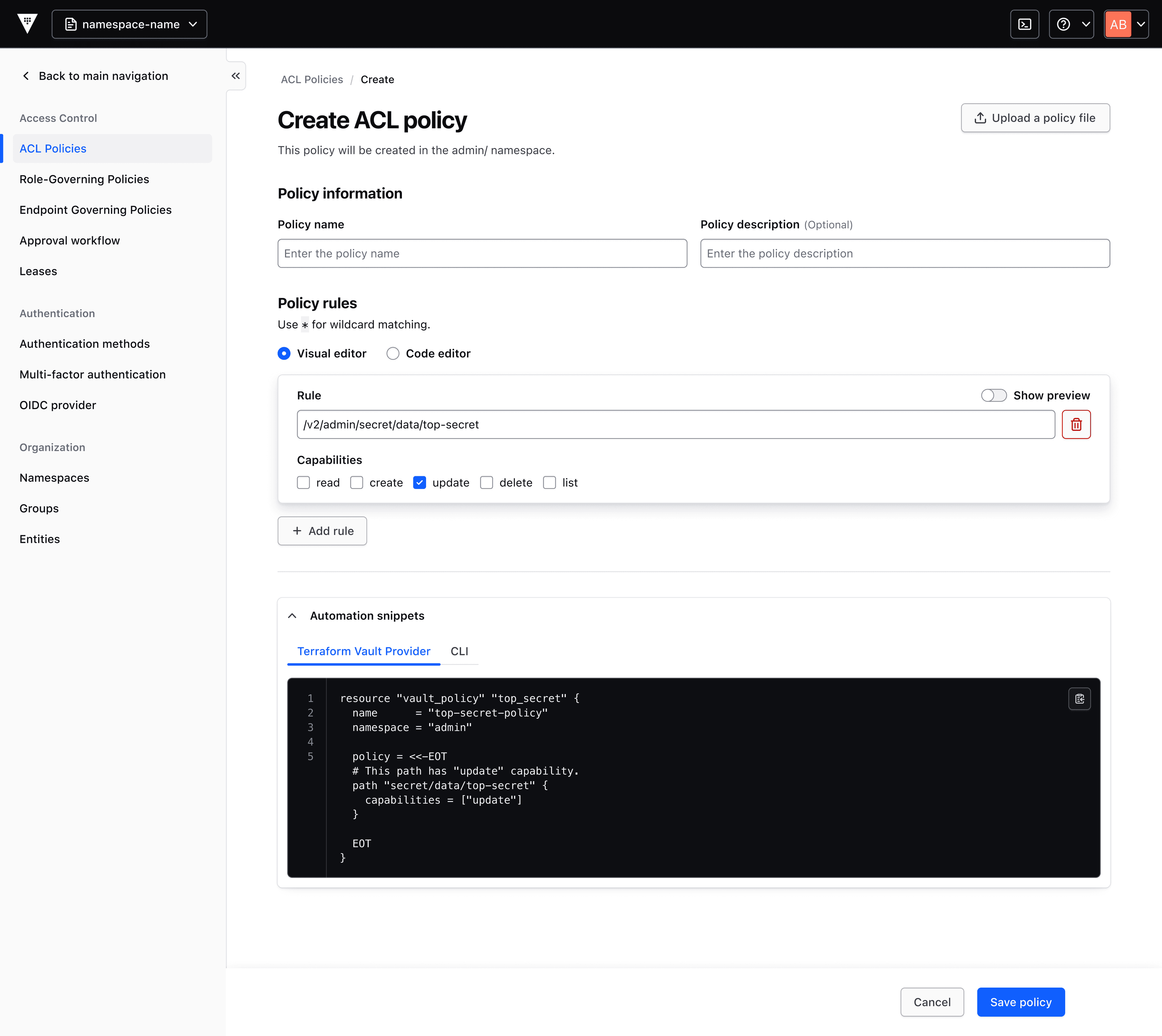
Figure 1: Displays the policy generator in the Vault UI for creating ACL policy.
A pre-filled contextual UI form is available to the customer to complete. Then, they will receive the properly formatted, best practices code for a Vault ACL policy, which they can save to their local Vault cluster or copy into their Terraform Vault Provider (or other script).
The visual policy generator automatically detects and populates as much of the necessary information as possible to help Vault users get started faster. However, users should still review the code to confirm it meets their specifications and policies before using.
»Onboarding wizard simplifies turning on features
Beginning with namespaces, Vault 2.0 includes an onboarding wizard pattern that guides users through the options available to them. This removes some of the choice overload that can overwhelm a user as they make the selection for the features that best meet their requirements.
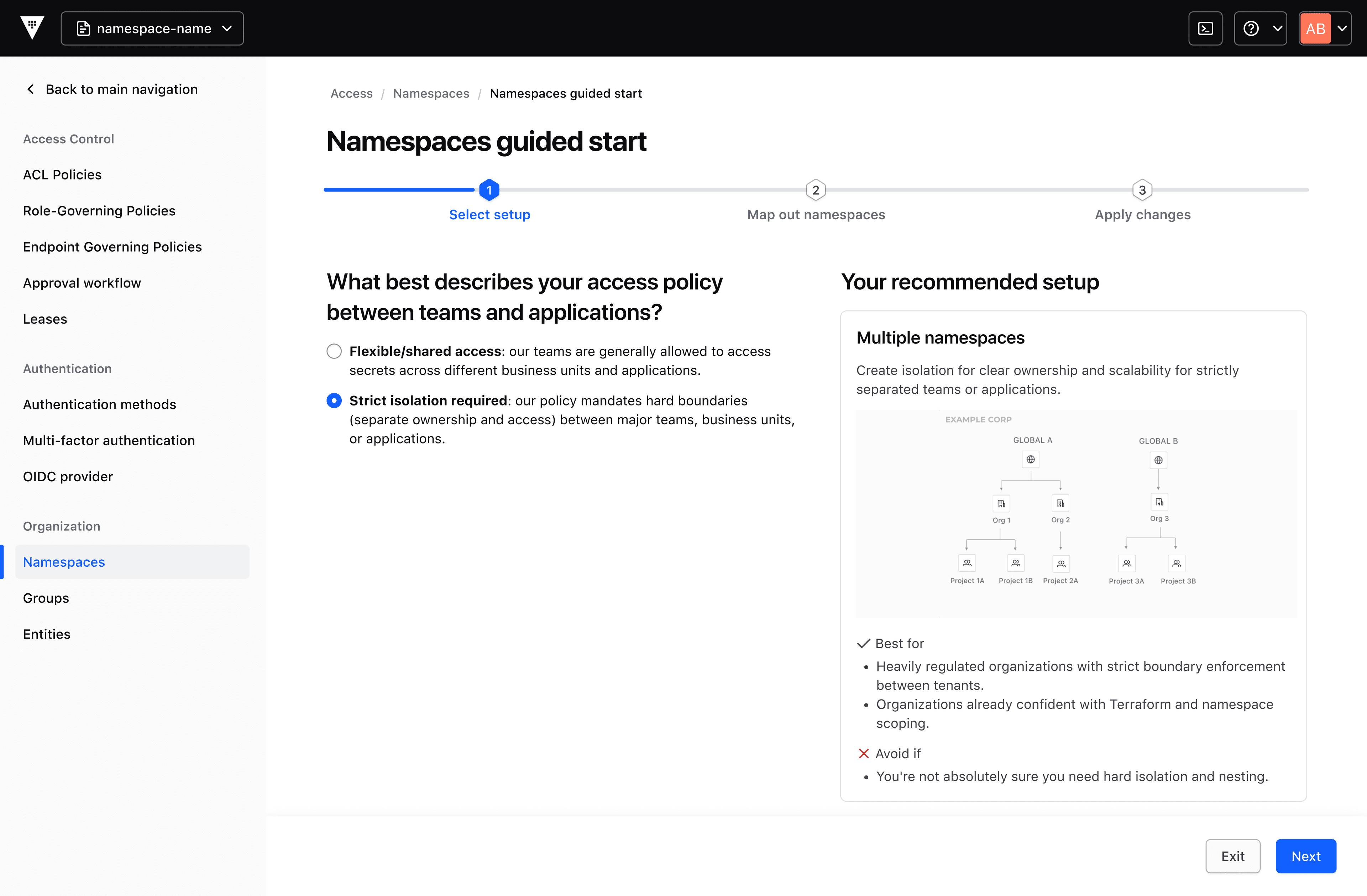
Figure 2: The user can see 3 steps in this pattern for Namespaces. After selecting the option that best aligns, a recommended setup is shown with helpful information about why this is best for their use case.
Following the selection, the wizard generates a Terraform code snippet, CLI command or option to apply their choices in the UI at the end. The onboarding wizard is being released with support for Namespaces in 2.0.0, with plans to support additional features in the future. Customers can always reach out to their account team to request support for particular features, as product and experience feedback are valuable inputs in our planning.
»Introductory pages provide at-a-glance information about unused features
Introductory features pages are being added to provide important details such as business case, use case analysis, links to documentation, and easy to follow diagrams so users can understand the value of Vault features without having to seek out external documentation.
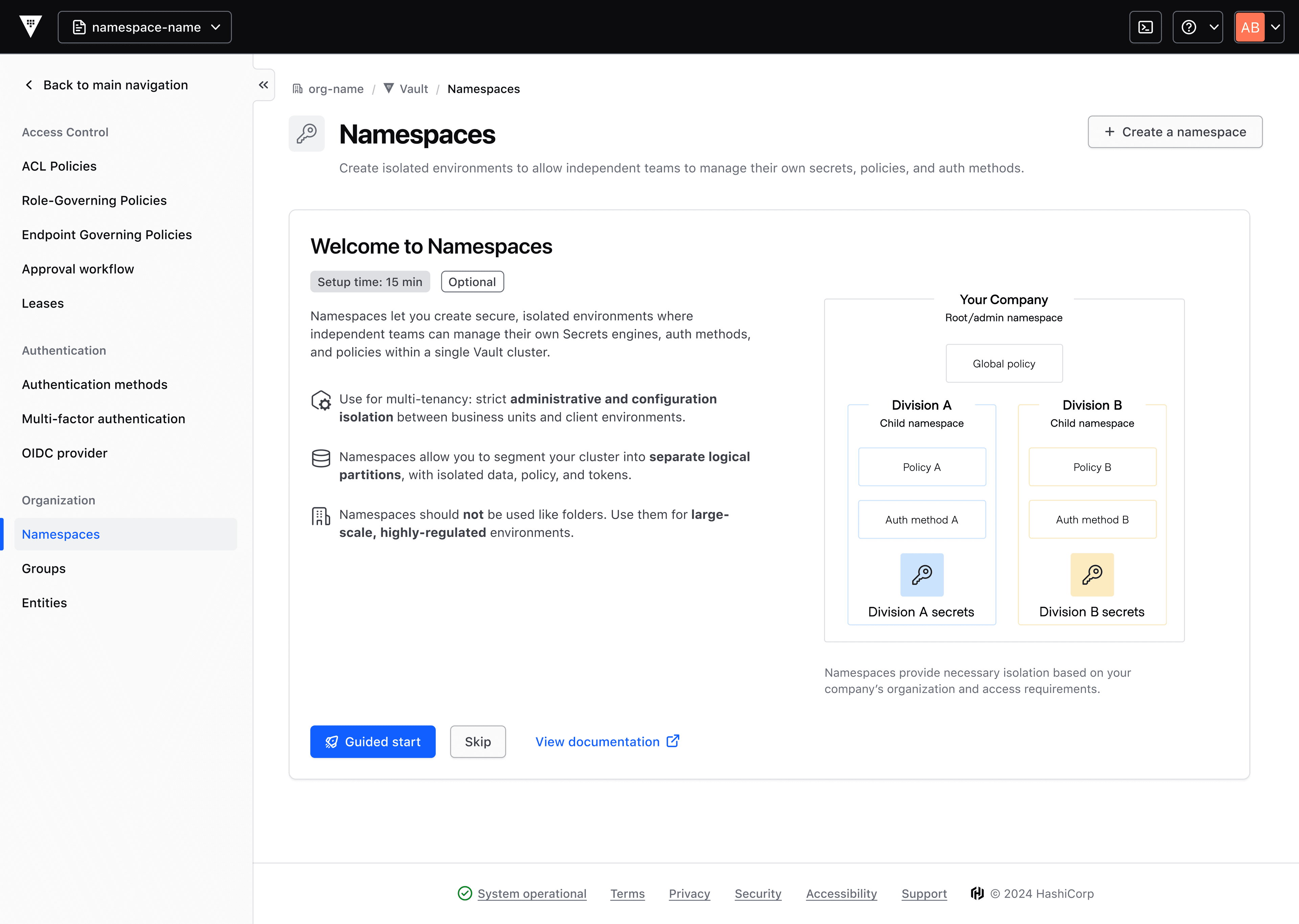
Figure 3: This enhancement to the UI addresses users who could benefit from in-product guidance and want contextual product knowledge and training.
Guided starts are embedded in the intro pages for easy setup of new features. Estimated set-up time helps preview their time investment.
This improvement is being rolled out in phases, with more introductory pages planned for other features.
»Navigation bar revamp centers the customer’s ‘problems to be solved’
Features are most valuable when they’re understood and used, but this can be difficult if they aren’t readily related to the customer’s challenges. We’ve revamped the navigation bar to group features by customer problems.
The goal here is to align Vault with the workflows customers want to complete. Additionally, we have renamed ‘control groups’ to ‘access workflows’, which is more market standard and intuitive.
»Reporting enhancements support expanded Vault usage
Secrets management isn’t the only use case for Vault. As customers have expanded to other use cases, we want to encourage them to continue experimenting for wider adoption of Vault. To that end, we’ve introduced reporting enhancements for visibility into licensing and consumption for customers who are licensed as such and have upgraded to Vault 2.x.x. and later. Usage is now measurable across the following units of measure for these Vault use cases:
Secrets management: number of managed secrets
Key lifecycle management: number of managed keys
Identity brokering: number of credential units issued
Data protection: number of data protection API calls
These units of measure are directly aligned to security outcomes and support Vault users in providing visibility to security and compliance stakeholders – whether that’s with budget reconciliation or pre-planning with more granularity in their forecasting.
With multiple use cases and the capability to measure across different units, these measurement and reporting enhancements allow Vault to deliver greater customer value with better cost-to-value alignment with pricing that encourages flexibility and growth.
»Learn more
IBM Vault 2.0 became generally available on April 14, 2026. You can read about the release on our blog and access the Vault release notes in our developer docs. Stay tuned as more IBM Vault and other HashiCorp news is published.