

For enterprises operating in highly regulated industries, monitoring privileged access isn't optional. Whether in financial services, healthcare, or critical infrastructure, regulations like SOX, DORA, PCI DSS, and HIPAA require detailed activity logging, robust audit trails, and the ability to detect and investigate suspicious behavior in real time.
HashiCorp Boundary already delivers powerful capabilities here: identity-based access control, session brokering, and session recordings that capture exactly what happened during privileged sessions. But security teams increasingly need more. They need structured event data flowing into their SIEM platforms so they can write detection rules, trigger automated alerts, and correlate privileged access activity with broader security telemetry.
This post explores how organizations can achieve both: combining Boundary's session recordings with kernel-level audit events using Elastic's Auditbeat to create a comprehensive, production-ready approach for monitoring privileged activity today.
»The challenge: Video recordings are powerful, but SOCs need structured text
Boundary's session recordings provide complete forensic detail – security analysts can review exactly what a user did during a session, including every keystroke, every command, and every response. For incident investigations, this level of detail is invaluable.
But security operations centers (SOCs) don't start investigations by watching videos. They start with alerts. They need structured, searchable, real-time event data that can trigger detection rules and prioritize analyst workflows.
Consider a typical scenario: A privileged user connects to a production database server through Boundary. During that session, they read /etc/shadow, attempt to escalate privileges with sudo, and run network reconnaissance tools. Boundary’s session recording captures all of this, but how does the SOC know to review it?
Without structured event data flowing into the SIEM, they don't. The session recording sits in storage, containing critical evidence of suspicious behavior, but invisible to automated detection systems.
What organizations actually need is a two-layer approach:
Real-time textual alerts in SIEM for triage and prioritization to detect high-risk behaviors like sensitive file access, privilege escalation attempts, or suspicious commands
Session recordings in Boundary for deep forensic investigation to get complete context once an alert has been raised
This combination delivers both speed and depth: automated detection plus full visual evidence.
»The solution: OS-level auditing with Auditbeat
Rather than attempting to parse video session recordings into structured text (which would be brittle and unreliable given the nature of terminal data streams) we recommend a different approach: capture audit events directly at the kernel level on target hosts using Elastic's Auditbeat.
Auditbeat provides kernel-level visibility into system activity by integrating with the Linux audit subsystem (auditd). This captures events at the source, before they even reach the terminal session, providing reliable, structured data that's purpose-built for security monitoring.
»What Auditbeat captures
When deployed on Linux target hosts, which Boundary brokers access to, Auditbeat captures:
Process execution (execve events): Every command executed on the system, including the full command line, executable path, user context, and result status. When a user runs cat /etc/passwd or nmap -sS 10.0.0.0/24, Auditbeat logs it.
File access events: Reads and writes to sensitive paths like /etc/shadow, /etc/ssh/sshd_config, or application configuration files. Security teams can monitor for unauthorized access to sensitive data.
Privilege escalation attempts: Every sudo or su command, successful or failed, with full context about what privilege level was requested and whether it was granted.
User and session context: The logged-in user, session metadata, process lineage, and container context (if applicable). This provides the identity information needed to correlate events back to specific users and sessions.
All of this data is emitted as structured JSON, ready for ingestion into any SIEM that accepts JSON over HTTP or syslog (including Elasticsearch, Splunk, and others).
»Why this approach works
This architecture is intentionally pragmatic. Auditbeat is production-proven, with low overhead on modern systems and widespread deployment across large enterprise fleets. It's SIEM-agnostic, meaning organizations aren't locked into a specific backend. And it aligns with the approach many large organizations already use for security monitoring and compliance auditing.
While HashiCorp is developing a native Boundary agent that will provide built-in audit event collection, this Auditbeat-based approach addresses enterprise requirements today using proven, widely-deployed tooling. Organizations can implement this architecture now and benefit immediately from comprehensive privileged access monitoring. The combination of Boundary and Auditbeat creates a complete picture:
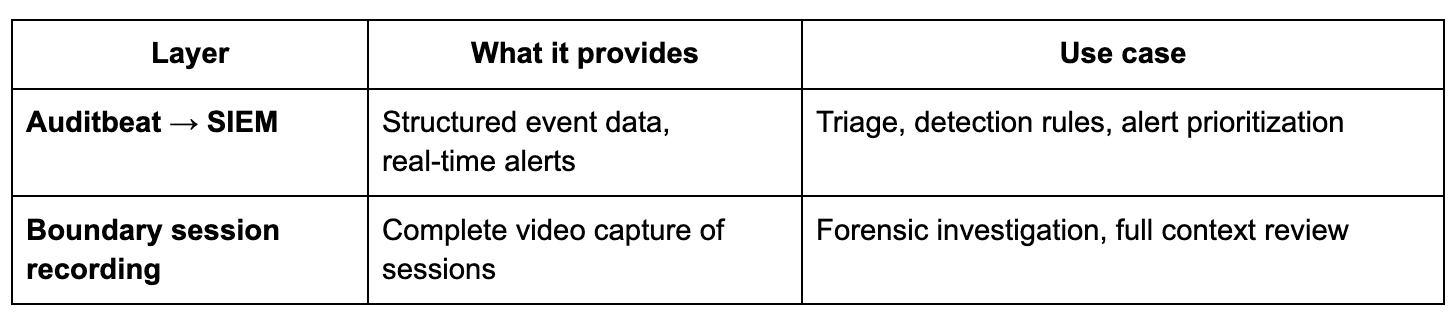
Boundary and Auditbeat
Security analysts can build detection rules in their SIEM for high-risk behaviors (reading sensitive files, running reconnaissance tools, privilege escalation) and when alerts fire, they know exactly which Boundary session recording to review for complete context.
»How correlation works
When an alert is raised in the SIEM from Auditbeat data, it contains all the information needed to locate the corresponding Boundary session recording:
Timestamp of the event
Target host (the Boundary target)
OS user (e.g.,
ubuntuorec2-user)Command or file accessed
The analyst locates the corresponding Boundary session recording by searching for sessions on that target, within the relevant time window, using the specified account. Once found, the recording provides complete context: what happened before the suspicious command, what happened after, and the full visual record of the session.
»Embedding Boundary identity metadata in logs
For organizations using Boundary Enterprise with Vault-signed SSH certificates, correlation becomes even more straightforward. Boundary can embed identity metadata (like project, user, and target information) directly into SSH certificate key IDs.
This results in SSHD log entries that include human-readable identifiers like:
Accepted publickey for drohan ... ID
boundary-project-demo-project-user-admin-target-ssh-demo-target
These identifiers can be parsed by log pipelines (using Filebeat or similar tools) into structured fields:
boundary.project→demo-projectboundary.user→adminboundary.target→ssh-demo-target
This makes it straightforward to line up SIEM alerts with Boundary's notion of user and target, even when multiple Boundary users share the same OS account.
»Getting started: A complete demo environment
To help organizations evaluate this approach hands-on, we've created a complete reference implementation that runs locally in Docker. The demo includes:
Boundary Enterprise with auto-configured SSH targets and Vault credential injection
Auditbeat collecting kernel-level audit events (execve, file access, privilege escalation)
Elasticsearch and Kibana with pre-configured dashboards and saved searches
Automated session generation simulating real-world Boundary sessions with commands like
sudo, file access to/etc/passwd, and process enumeration
SSHD log collection via Filebeat showing Vault-signed certificates with Boundary identity metadata
»Quick start
# Clone the repository
git clone git@github.com:learhy/auditbeat-boundary-demo.git
cd auditbeat-boundary-demo

# Add your Boundary Enterprise license
cp /path/to/your/boundary-license.hclic .

# Start the demo
./auditbeat-demo.sh start
The demo takes approximately 3-4 minutes to initialize, after which you can explore the full correlation workflow on your local machine at http://localhost:5601.
»Recommended saved searches
Once the stack is running, explore these pre-configured saved searches in Kibana's Discover view:
SSH execve by ubuntu (auditd): Shows actual commands executed by the ubuntu user as seen by the kernel audit subsystem. Use this to validate that Boundary-driven SSH sessions generate the expected execve audit events.
SSH cert logins from Boundary (sshd): Shows SSHD log entries where Vault-signed certificates are used, including parsed Boundary identity metadata for each session.
By comparing timestamps and host/user fields across these searches, you can see exactly how SIEM alerts correlate with Boundary session metadata.
»Key configuration snippets
The demo configures Boundary and Vault so SSH certificates carry useful identity information. In the Vault SSH credential library configuration one can configure metadata to be directly injected into the SSH certificates:
type       = "vault-ssh-certificate"
key_id     = "boundary-project-{{ .Project.Name }}-user-{{ .User.Name
}}-target-{{ .Target.Name }}"
This template embeds Boundary's project, user, and target names directly into the SSH certificate key ID, which then appears in SSHD logs and can be parsed into structured SIEM fields.
»Licensing considerations
Auditbeat is available under the Elastic License 2.0 (ELv2). For most enterprises deploying Auditbeat internally on their infrastructure to monitor their systems and ship logs to their own SIEM, this license presents no restrictions.
The primary restriction to be aware of: organizations cannot offer Auditbeat itself as a hosted or managed service to third parties. This primarily affects Managed Security Service Providers (MSSPs) who want to repackage Auditbeat as part of their own managed product. If your organization plans to run a managed service, legal teams should review ELv2 to ensure compliance.
»Known limitations
This architecture is intentionally production-ready today, but there are limitations organizations should understand:
Manual correlation: There's currently no automatic "click-through" from a SIEM alert to a specific Boundary recording. Analysts use timestamp, user, and target metadata to locate the corresponding session. This process is well-defined but not fully automated.
Shared account disambiguation: When multiple Boundary users share the same OS account (a common pattern with accounts like ubuntu or ec2-user), the embedded SSH certificate key IDs help identify which Boundary user initiated the session. The exact session is still identified by correlating time and target information.
Session ID correlation: The Boundary session ID itself is not currently embedded into SSH certificates or logs. Correlation relies on timestamp, user, and target rather than a direct session_id field.
»Coming soon
This Boundary + Auditbeat architecture provides a strong, immediately deployable foundation for monitoring privileged activity. As Boundary's capabilities continue to evolve, we anticipate even tighter integration between Boundary sessions and SIEM events, potentially including direct session ID correlation and automated linking between alerts and recordings.
Looking ahead, HashiCorp is exploring additional solutions that provide advanced audit event collection and correlation capabilities. This will eliminate the need for third-party audit tooling while offering deeper integration with Boundary's session metadata, including automatic session ID correlation, simplified deployment, and tighter coupling between session recordings and structured audit events. While this capability is still in the planning stages, it represents our long-term vision for comprehensive, out-of-the-box privileged access monitoring.
»Try it yourself
The demo environment provides everything needed to evaluate this approach in your own environment.
The demo runs entirely in Docker and includes automated setup for all components. In 3-4 minutes, you can see exactly how SIEM alerts from Auditbeat events correlate with Boundary sessions and understand how this architecture can enhance your own privileged access monitoring.